

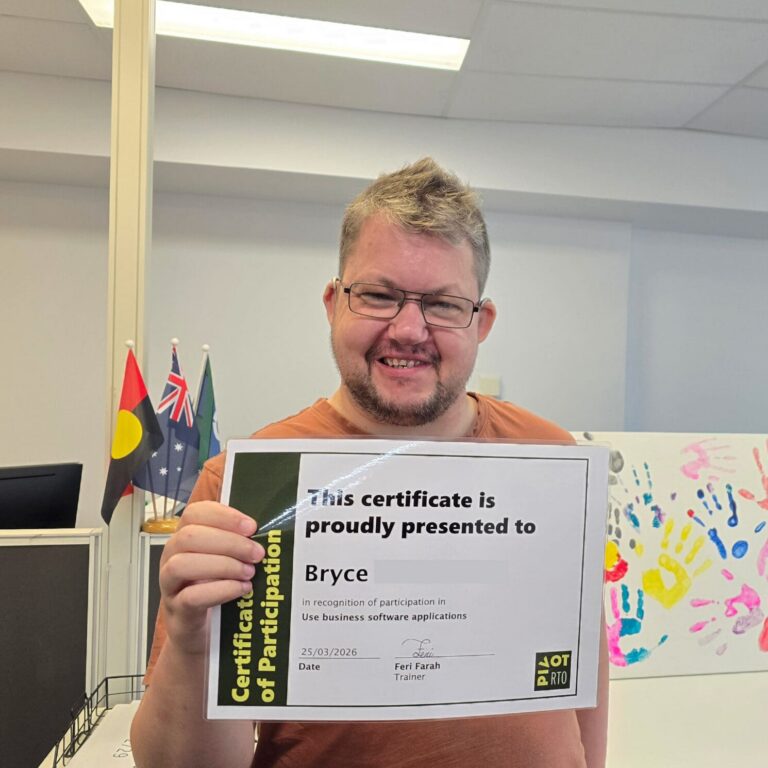
Bryce’s successful completion of the Digital Essentials course through the Skills for Education and Employment (SEE) Program showcases how learners can build foundational digital skills, gain self-confidence, and meet new people within the community. This achievement highlights the importance of a digital literacy skills framework in guiding effective learning and supporting positive outcomes.
Digital Essentials provides training in basic programs with dedicated support from trainers, such as Feri, in a welcoming environment. Through the course students gain confidence, overcome digital barriers, make new friends through engaging group work, and are catered to based on their specific requirements.
Course Content at a Glance
- Learning the basics of several programs.
- Mastering formulas in Microsoft Excel.
- Developing independent troubleshooting skills.
- Participating in collaborative group work.
Skills Bryce Developed
- Using formulae in Excel instead of typing sums manually.
- Searching for information online to troubleshoot issues.
- Troubleshooting basic software problems independently.
Overcoming Barriers: Building Digital Literacy Skills Framework and Confidence
Bryce joined the SEE program with the goal of building his digital skills and connecting with others in his community.
With the support of Trainer Feri, Bryce worked steadily toward his goals, with a particular focus on navigating Microsoft Excel.
Using the digital literacy skills framework, Feri supported Bryce to complete two units of accredited training, strengthening practical digital skills that align with real everyday and workplace tasks.
Developing Basic Digital Literacy Skills
Starting with BSBTEC101 Operate digital devices, Bryce began by learning foundational digital device skills. These included accessing and logging onto devices, as well as customising settings to suit individual usage needs.
As he progressed, Bryce worked with Feri to navigate and organise the device more confidently. This included creating shortcuts and folders, downloading and storing applications and documents, and managing files effectively.
The unit concluded with building confidence in moving through folders and content, and correctly deactivating the device.
This training marked the conclusion of Bryce’s Digital Essentials program. Keen to build on these foundations and apply digital skills in different contexts, Bryce chose to enrol in further training with Pivot Training.
Using Business Software Applications
Building on Digital Essentials, Bryce undertook the BSBTEC201 Use business software applications unit, where he progressed to learning the core functions of Microsoft Excel.
Throughout the unit, Feri supported Bryce to develop confidence using Excel, including navigating the program, applying formulas, and understanding how to resolve common issues as they arose. This class helped Bryce strengthen his digital skills in a way that reflects real workplace and everyday use.
Feri taught me how to use formulae instead of typing the sums manually, and also how to troubleshoot independently.
With no prior experience using Excel formulas or troubleshooting errors, the class helped build Bryce’s confidence and capability. The skills he developed inspired him to continue learning new digital skills after graduating the course.
Other Benefits of the Skills for Education and Employment (SEE) Program
Our SEE Program is highly adaptable, working closely with learners to support their individual needs and goals. By tailoring training to each learner, we help create the best possible learning journey while still encouraging them to step outside their comfort zone, build confidence, and strengthen their skills.
They make you feel so welcome and cater to your needs/requirements.
Making Friends While Developing Adult Digital Skills
Prior to joining Pivot Training, Bryce hoped to meet new people in his community. Through his training, he achieved exactly that. Bryce was especially surprised by how engaging and enjoyable Feri made the group work, which helped him build new connections while developing new skills.
[I was most surprised by] how much fun I have had through the group work Feri gave to us, and how many new friends I have made.
Through our SEE Program, learners can expect to build new connections alongside developing new skills. We are passionate about fostering a welcoming, inclusive environment where interactive group work encourages learners to be themselves, connect with others, and build friendships while progressing together throughout their learning journey.
How the Digital Literacy Skills Framework Supported Bryce to Achieve His Goals
Bryce joined the SEE Program and Digital Essentials course in Pivot Training Fremantle with the goals of building new digital skills and meeting new people in his community. Through the program, he developed essential capabilities, from confidently operating digital devices to using formulas in Excel and troubleshooting issues as they arose.
With the welcoming and tailored support of his Trainer, Feri, Bryce was supported to grow his skills while enjoying the learning process. Along the way, he made new connections through group activities and shared learning experiences, reinforcing that training can be both practical and social.
Stories like Bryce’s reflect what our SEE Program is designed to deliver: practical digital skills, supportive learning, and meaningful community connection.
Find a Pivot Training location near you to start your Digital Essentials journey today and meet new people in your community.
FAQ
What is Digital Essentials?
Digital Essentials is a course offered through The Skills for Education and Employment (SEE) Program designed to help learners build their foundational digital skills.
Who provides the Digital Essentials training?
The training is provided by Pivot Training, a Registered Training Organisation (RTO) with locations across South Australia and Western Australia.
What skills do you learn in Digital Essentials?
Learners are taught the basics of operating devices and troubleshooting technical issues independently.
Does Pivot Training help with problem-solving skills?
Yes, trainers at Pivot Training teach learners how to search for information to troubleshoot and resolve issues on their own.
Are there social benefits to joining the Digital Essentials course?
Yes, learners have the opportunity to meet new people in the community, participate in group work, and make new friends.
Who can help me during the Digital Essentials course?
Dedicated trainers provide support throughout each learner’s journey to help them achieve their digital literacy goals.
Why should I choose Pivot Training?
Pivot Training makes learners feel incredibly welcome and actively caters to their specific needs and requirements.
Does the Digital Essentials course help build confidence?
Yes, completing the course and mastering new tools helps learners gain greater confidence in themselves.
What can I do after completing the Digital Essentials course?
Graduates often continue their learning journey by enrolling in other courses or applying their newfound skills to employment opportunities.
The Skills for Education and Employment (SEE) Program is funded by the Australian Government Department of Employment and Workplace Relations.